Automatic Rollup Calculations in Jira: Sum-Up Custom Field
Managing hierarchical work in Jira often means manually calculating totals across child issues. How many story points are in this epic…
Managing hierarchical work in Jira often means manually calculating totals across child issues. How many story points are in this epic? What’s the total time spent on this initiative? These questions may require clicking through dozens of issues.
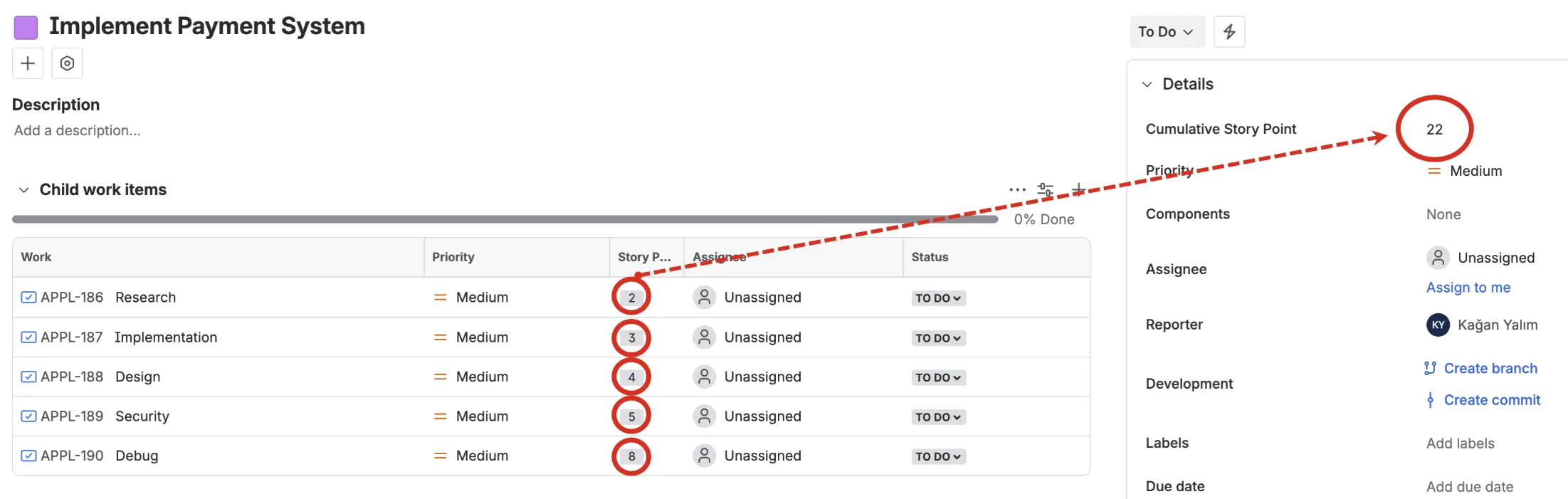
The Problem with Manual Aggregation
Jira’s native hierarchy (Initiatives → Epics → Stories → Sub-tasks) is powerful for organizing work, but it lacks built-in rollup calculations. Project managers and team leads frequently need to:
- Report total story points at the epic or initiative level
- Track cumulative time spent across all child work items
- Monitor budget consumption across a feature set
- Calculate remaining estimates for release planning
Without automation, this means spreadsheets, manual addition or complex automation scripts.
How the Sum-Up Field Works
The Sum-Up custom field provides a simpler approach:
1. Configure once: Add an instance of “Sum-up field” and on the field configuration select any numeric field (Story Points, Time Spent, Original Estimate, or your own custom number fields).
2. Apply to parent issues: Add the Sum-Up field to your Epics, Initiatives, or any parent issue type and add field to related “view issue screen”.
3. Automatic calculation: The field recursively traverses all child issues and displays the total.
The recursive calculation is key. An Epic containing 5 Stories, each with 3 Sub-tasks, will sum values from all 20 issues automatically.
Practical Applications
Agile Portfolio Management: Configure Sum-Up to aggregate Story Points on your Epics. Portfolio managers can instantly see the size of each epic without drilling down. Sprint planning becomes faster when you can compare epic sizes at a glance.
Time Tracking at Scale: Sum “Time Spent” on parent issues to understand where effort actually goes. This visibility helps with:
- Client billing accuracy
- Retrospective analysis
- Resource allocation decisions
Release Readiness: Create a Sum-Up field for “Remaining Estimate” on your release tracking issues. As teams complete work, watch the total remaining effort decrease in real-time. No more asking “are we on track?” when the answer is visible on the issue itself.
Budget Control: For teams tracking costs per issue, summing a custom “Cost” field on Initiatives provides immediate budget visibility. Finance and product teams share a single source of truth.
Why Recursive Matters
Many rollup solutions only calculate one level deep. The Sum-Up field’s recursive approach handles real-world Jira hierarchies where work is nested multiple levels:
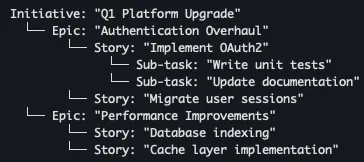
A Sum-Up field on the Initiative captures values from every level: Epics, Stories, and Sub-tasks combined.
The Sum-Up field is available as part of the Custom Fields for Jira app, or as a standalone app on the Atlassian Marketplace.