Getting Work Done in Jira
Managing Your Personal Workflow in Jira with Getting Work Done
Managing Your Personal Workflow in Jira with Getting Work Done
Jira is an essential tool for project management and team collaboration. However, for individual users, it can sometimes feel overwhelming. With so many tickets, notifications, and backlog items, it is often hard to answer a simple question: “What do I need to do right now?”
We built Getting Work Done to solve this problem. It doesn’t change how your team uses Jira. Your project managers still get their reports, and your team still sees their boards. Instead, it changes how you manage your own tasks within that ecosystem.
We designed it around four key modules: Inbox, Actions, Agenda, and Matrix, inspired by methodologies like Getting Things Done (GTD) © and the Eisenhower Matrix.
Here is how it helps you manage your daily workflow.
Inbox: Collect your works
The Inbox is your starting point and puts you in control of your input stream. Unlike the standard Jira notification center, which floods you with every status update or comment, the Inbox acts as a buffer. It does not automatically populate with every issue assigned to you; instead, you consciously select and add the Jira issues you want to track.
Crucially, the Inbox lets you create Private Tasks. Not every to-do item requires an official Jira ticket. You might need to “Email the client,” “Review documentation,” or “Prepare meeting notes.” Creating a Jira issue for these feels excessive, but writing them on a sticky note disconnects them from your workflow. The Inbox allows you to create these private tasks alongside your Jira issues, making it the single source of truth for your entire day.
Learn more about our Inbox feature here.
Actions: Applying GTD®
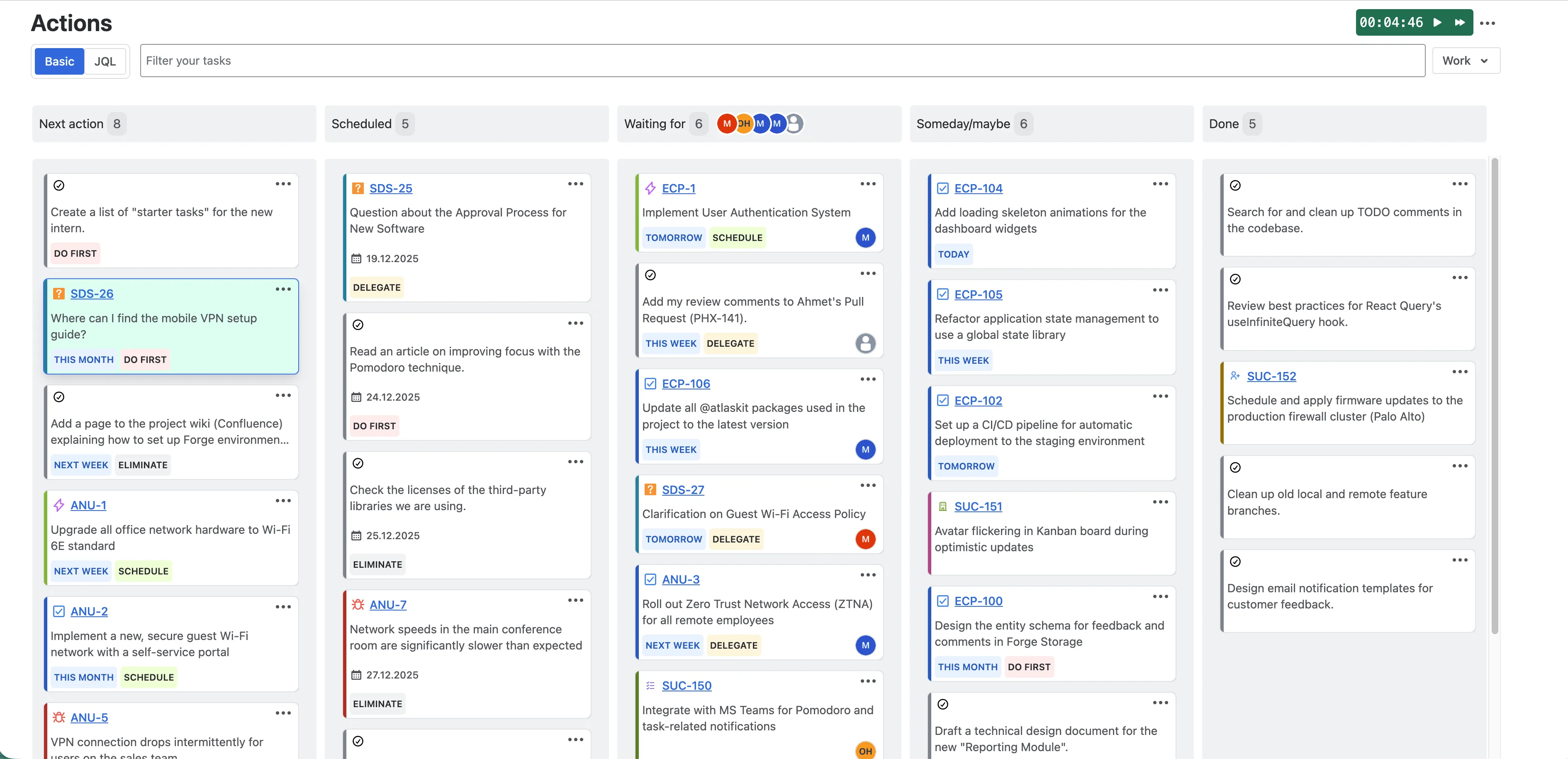
Once you have collected your tasks in the Inbox, you need to process them. The Actions module is designed based on the Getting Things Done (GTD)® methodology. It moves away from the concept of a static “To-Do” list and uses dynamic lists based on the current state of the task:
- Next Action: These are tasks that are unblocked and ready to be worked on immediately. This is your primary execution list.
- Scheduled: Tasks that have a specific time or date attached to them.
- Waiting For: Tasks you have delegated to others or tasks that are blocked by external dependencies. Keeping them here ensures you don’t lose track of work you are waiting on.
- Someday/Maybe: Ideas, low-priority tasks or improvements you might want to do in the future, but not right now.
- Done: Completed tasks.
You don’t have to constantly scan a long list to find what is actionable; you simply go to your “Next Action” list and start working.
Learn more about our Actions feature here.
Agenda: Flexible Scheduling
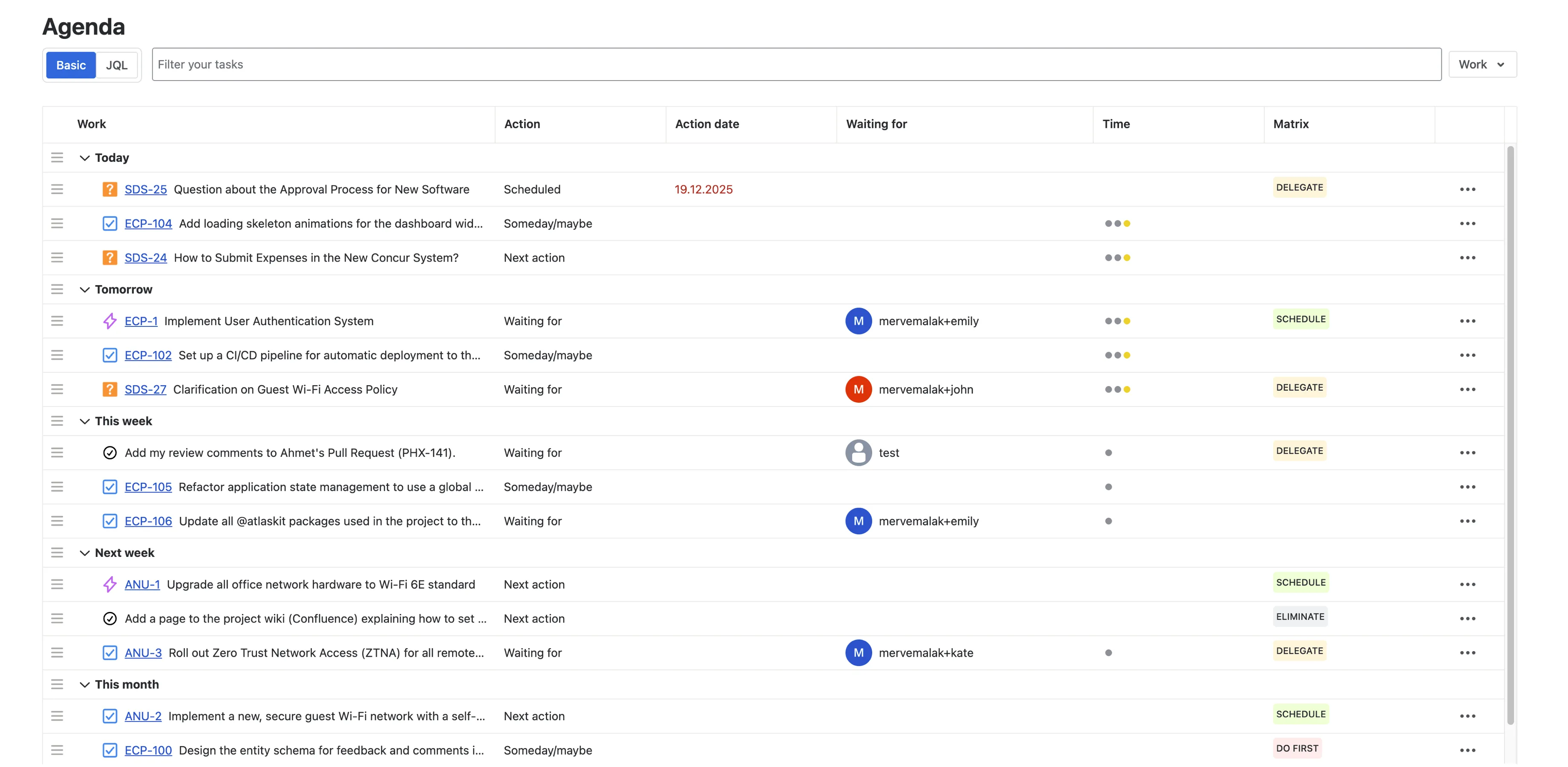
While “Actions” helps you categorize what to do, Agenda helps you plan when to do it. A list of tasks doesn’t account for the reality of a limited workday.
This is where you manage your time. You can view your tasks alongside your calendar events to see your true availability. The Agenda offers flexibility. Instead of rigid deadlines, you can organize your day by dragging and dropping tasks into time contexts (Today, Tomorrow, This Week, Next Week, and This Month), allowing you to map out your short-term and long-term priorities effectively.
The key feature here is Time Blocking. Instead of working against rigid deadlines, you can drag and drop tasks into specific time slots on your day. This helps you:
- See if your plan for the day is realistic given your meeting schedule.
- Dedicate specific blocks of time for deep work.
- Prevent overcommitment by visually filling up your available hours.
Learn more about our Agenda feature here.
Matrix: Prioritization
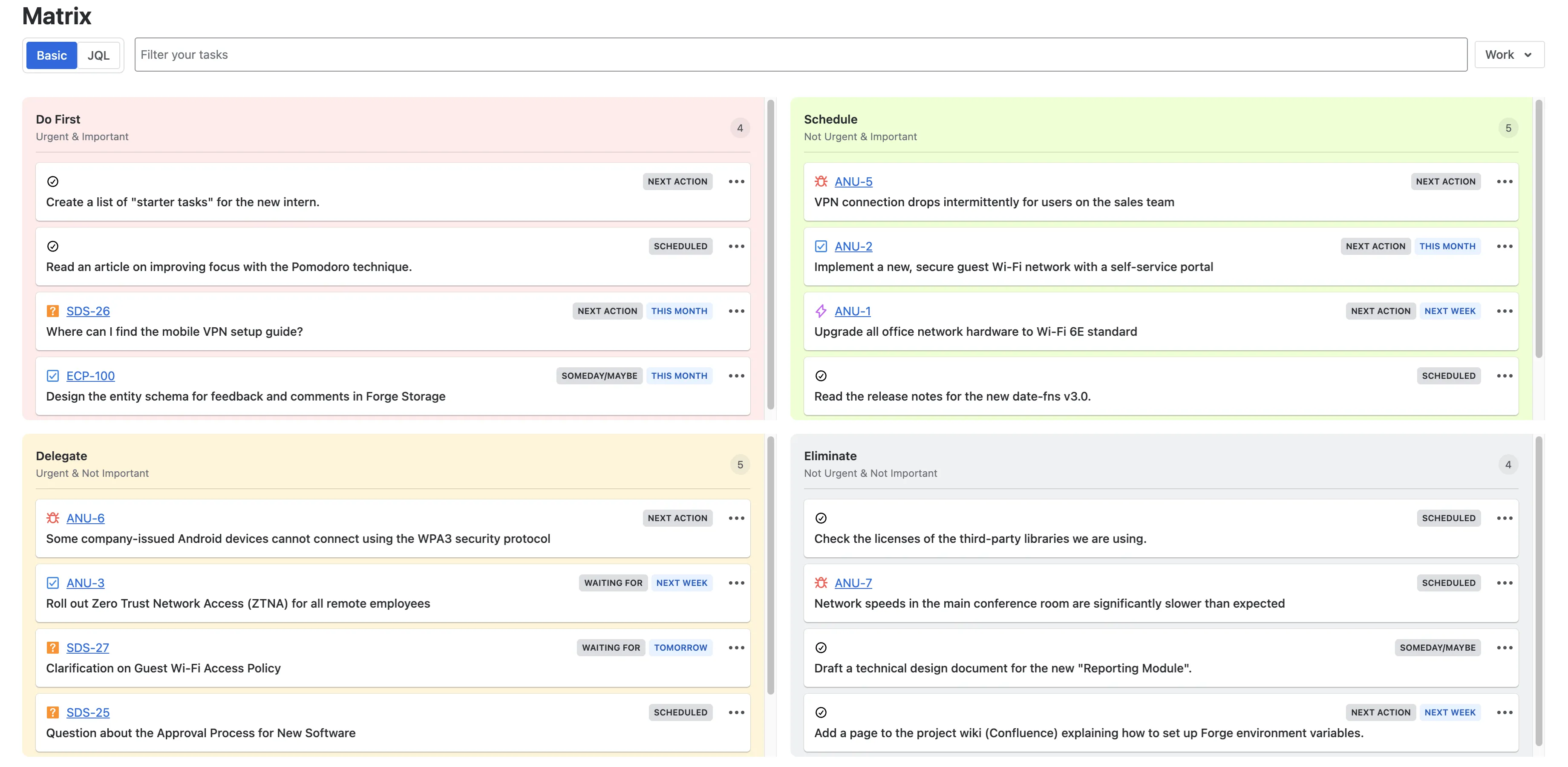
Having a list of tasks doesn’t tell you which ones are actually important. When everything looks urgent, nothing is. The Matrix module uses the Eisenhower Matrix to help you prioritize visually.
It divides your screen into four quadrants based on urgency and importance:
- Do First (Urgent & Important): Tasks that require immediate attention and drive value.
- Schedule (Important but Not Urgent): Strategic tasks that need to be planned (often the most neglected category).
- Delegate (Urgent but Not Important): Tasks that demand time but don’t necessarily require your specific expertise.
- Eliminate (Neither Urgent nor Important): Distractions that should be removed from your workflow.
You can drag and drop tasks between these quadrants. This visual approach makes it easier to spot low-value tasks (“busy work”) that are taking up your time and helps you refocus on the “Do First” and “Schedule” quadrants.
Learn more about our Matrix feature here.
Focus: Built-in Pomodoro Timer
Our Getting Work Done app includes an integrated Pomodoro Timer to help you maintain focus.
You don’t need to leave Jira or open a separate timer app. Simply select a task from your list, start the timer, and commit to a focused work session (usually 25 minutes). When the session ends, the app prompts you to take a break. This technique is proven to reduce mental fatigue and prevent burnout by enforcing regular rest intervals alongside deep work.
Learn more about our Pomodoro Timer feature here.
History: Track Your Progress
Productivity isn’t just about getting through the day; it’s about understanding how you work. The History page provides analytics on your personal performance using various charts.
It allows you to:
- Review your weekly velocity (how many tasks you completed).
- Identify your most productive days of the week.
- Analyze trends in your workflow over time.
- Track your focus sessions. See how much deep work time you logged and your average session duration.
Seeing your past activity provides a sense of accomplishment and offers the insights needed to plan better for future sprints or weeks.
Learn more about our History feature here.
Summary: The Power of Personal Focus for Enterprise Success
By leveraging Inbox, Actions, Agenda, and Matrix, individuals using Jira can maintain focus in complex project landscapes while enabling seamless personal workflow management.
Whether your daily work requires the structured workflow of GTD® , the visual prioritization of the Eisenhower Matrix, or simply a better way to manage Private Tasks alongside Jira tickets, Getting Work Done ensures you have the right tools to stay organized and efficient without leaving your project management platform.
It is available on the Atlassian Marketplace.
GTD® and Getting Things Done® are registered trademarks of the David Allen Company. Getting Work Done is not affiliated with, approved by, or endorsed by the David Allen Company.