“How Has Our Team Been Treating This Customer?” Answer It Instantly From Any Jira Issue
Every support agent knows the feeling. A ticket comes in, you start investigating, and halfway through your response you discover the…
Every support agent knows the feeling. A Jira ticket comes in, you start investigating, and halfway through your response you discover the customer already reported the same problem last week, to a different agent who handled it differently. Or worse, the customer is dealing with five open issues and nobody on the team has the full picture.
The root cause? When you open a ticket, you see that ticket. Not the customer behind it. Not their history. Not whether your team has been meeting SLAs for them. Just one issue in isolation.
That’s one of the problems Related Issues feature in Similar & Related Issues Finder solves.
One Panel, Full Customer Context
Related Issues lets you define a relationship (in this case, “Issues of the same customer”) and displays all matching issues directly on the issue view. No JQL filters to craft, no dashboards to switch to. The context is right there, where you need it, when you need it. Including all the custom fields you need to.
Here’s what it looks like in practice:
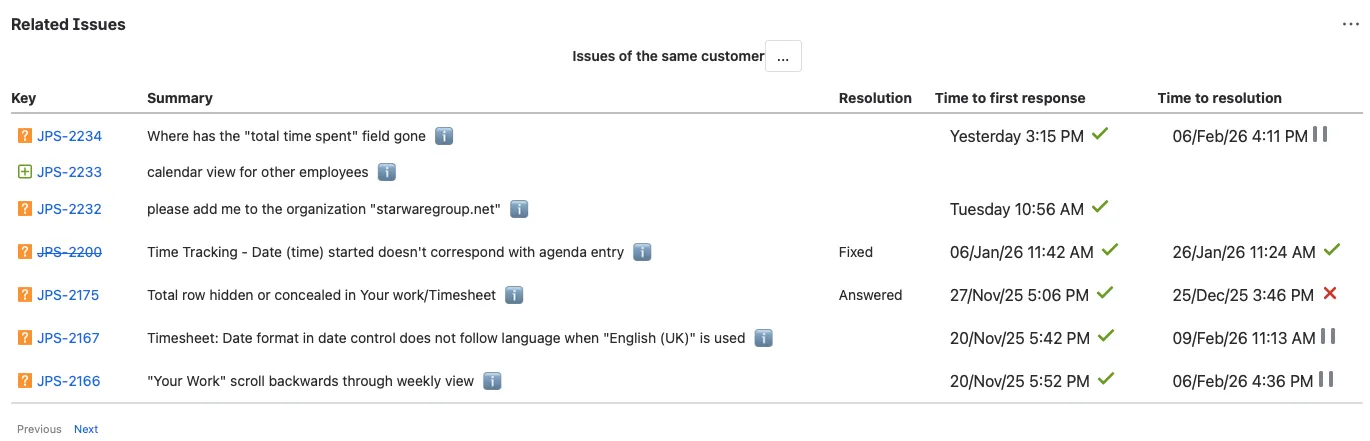
When an agent opens issue PRJ-2160, they immediately see every other issue from the same customer, spanning multiple months and covering different topics. The panel turns a single ticket into a customer 360° view.
SLA Performance at a Glance
The columns you see in the panel (Resolution, Time to first response, Time to resolution) are fully customizable. You choose which fields to display, so a support team might focus on SLA metrics while a development team might show Priority, Fix Version, or Components instead.
Notice the “Time to first response” and “Time to resolution” columns. Each row shows whether your team met its SLA targets for that specific issue: green checkmarks for met, red crosses for breached, and pause icons for issues still in progress.
And if a summary isn’t enough context, clicking the ℹ️ icon next to any issue reveals its full description in a tooltip, so you can dig deeper without navigating away from the current issue.
Before you even start typing your response, you can answer a critical question: How has our team been treating this customer? If you see a string of SLA breaches, that changes how you prioritize and communicate. If everything is green, you know your team has been responsive and you want to keep that streak going.
Spot Patterns Instantly
Looking at the list, a support agent can immediately see that this customer’s issues cluster around timesheet and time tracking functionality. You can tailor your response with that context, anticipate follow-up questions, and potentially flag recurring pain points to the product team.
Open vs. Resolved at a Glance
Some issues show a resolution status like “Fixed” or “Answered,” while others are still open (indicated by the pause icon on the resolution timer). An agent can instantly see how many active issues this customer is dealing with. A customer with multiple open issues might need escalation or a more proactive communication approach, and now you know that before you respond.
The Real-World Impact
Consider the typical support workflow without this feature:
- Agent receives a ticket
- Agent investigates the issue in isolation
- Agent responds, possibly duplicating advice already given in another ticket
- Customer gets frustrated repeating context
- Manager has no visibility into per-customer SLA trends
Now consider the workflow with Related Issues:
- Agent receives a ticket
- Agent sees the customer’s full history, open issues, and SLA performance, instantly
- Agent responds with full context, referencing prior interactions if relevant
- Customer feels understood
- SLA trends per customer are visible to anyone viewing any of their issues
This is especially valuable for Jira Service Management teams handling external customers, where the relationship matters as much as the resolution.
Beyond Same-Customer: Other Relationship Types
“Issues of the same customer” is just one relationship you can configure. The Related Issues feature supports multiple relationship types, so you can set up panels for issues sharing the same component, the same epic, similar text content, or any other criteria that makes sense for your workflow.
The “…” menu next to the relationship label lets you switch between different configured relationships or customize the view, making it flexible enough to adapt to different team needs.
Getting Started
Setting up the “Issues of the same customer” relationship takes just a few minutes. Install Similar & Related Issues Finder from the Atlassian Marketplace, configure a Related Issues relationship based on the reporter (or organization, for JSM), choose which columns to display.
Your agents get customer context without changing their workflow. No extra clicks, no extra tabs, no extra training.
Similar & Related Issues Finder is available on the Atlassian Marketplace. Try it free and give your support team the context they’ve been missing.