Overview of CVE-2021-44228 Vulnerability in Atlassian Ecosystem
I bet that you have heard of CVE-2021-44228. Even the Youtubers are making videos about it. The reason for its popularity is, it has…
I bet that you have heard of CVE-2021-44228. Even the Youtubers are making videos about it. The reason for its popularity is, it has vulnerability score of 10 over 10, it is as bad as it can be. The reason for this, it potentially allows a non authenticated attacker to execute code remotely. You can read more about its details on CICA’s web site.
Atlassian published a detailed analyze of this vulnerability regarding their products.
Atlassian has already patched their cloud product so if you are using Atlassian Cloud and not using any 3rd party add-on you are safe from now on. They also stated that, they haven’t found an indication of this vulnerability is exploited. If you are using cloud add-ons they may be still affected. Atlassian Connect Spring is Java based official framework for cloud add-on development and an add-on developed using this framework may be using vulnerable version of Log4J. Connect framework itself does not vulnerable, unless the vendor explicitly make use of a vulnerable Log4j version. Connect add-ons have their own application servers and communicate with Atlassian host products, such as Jira, Confluence, through REST API calls. If an hacker has remote code execution capability on a cloud add-on’s server, that means they can also perform some actions on host product using REST APIs. Atlassian has reported that, they have scanned all cloud apps and determined a few affected apps. They are also ensuring that vendors are fixing the found vulnerabilities.
If you are using Atlassian’s Server or DC products it is more complicated. If you are using Bitbucket Server/DC released before 15 December 2021, you are affected and you should perform mitigation actions which are very easy to do. Although emote code execution is not possible there is still a potential of information leakage.
All other on-premise products, such as Jira, Confluence, etc. are not effected. Because they don’t use effected version of Log4J, they are bundling a self maintained version of Log4J which is not effected. This vulnerability is mostly effecting Log4j version 2, not Log4j version 1. Log4j version 1 has another vulnerability, CVE-2021-4104, but it is not as critical as CVE-2021-44228.
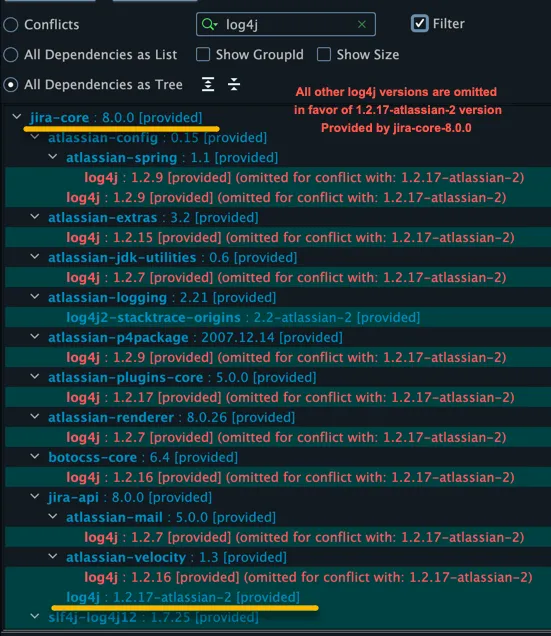
As you can see in above screenshot, Atlassian is bundling their own version of Log4j version 1, which is not vulnerable to CVE-2021-44228. But, a 3rd party add-on may still bundle a vulnerable version of Log4j. Atlassian has already scanned 3rd party apps and found some vulnerable ones. They are closely monitored by Atlassian and vendors have given a very strict deadline for fixing. Atlassian will also inform customers of these apps.
As The Starware, none of our server/DC apps are vulnerable. We don’t use and bundle any version Log4J with our apps.
You can also easily fix your own on-premise Jira installation without waiting someone else to fix a vulnerable app. Even if you are not vulnerable, there is no harm in applying these fixes as an extra precaution.
- make “WEB-INF/classes/log4j.properties” file readonly so that no one can change it.
- Add “
-Dlog4j2.formatMsgNoLookups=true"JVM option to “JVM_SUPPORT_RECOMMENDED_ARGS” in setenv.sh or setenv.bat files. If you are running the host product as a Windows service please or in another way, please refer to here to learn how to set it. - If you can stop Jira instance stop it and execute following commands to remote some problematic classes from Log4j. What these commands to is remove them from “.jar” files.
zip -d log4j-*.jar org/apache/logging/log4j/core/lookup/JndiLookup.classzip -d log4j-*.jar org/apache/log4j/net/JMSAppender.class- If you can’t restart the server for any reason, you can patch Log4j classes on running instance using a JVM agent. You have to build it yourself and transfer the resulting “target/Log4jHotPatch.jar” to Jira/Confluence server. Any Java developer can perform it within a few minutes. You have to perform this for every instance of a DC installation.