JavaScript Source Map Issue with Webstorm
In Java there are more strict rules and standards about who you organize your code. There is an accepted standard for naming folders…
In Java there are more strict rules and standards about who you organize your code. There is an accepted standard for naming folders (packages), files, variables, methods etc. In JavaScript there is there is no universally accepted standards. Since there is no standard, I’m playing a lot with organization of my code from time to time. Lately I have done a complete refactor of code organization and divided my code to more folders. It is a AWS Lambda based project by the way.
- src/jira/functions
   - event.ts
   - .....
- src/confluence/function
- event.ts
- .....As you can see, I have event.ts file in both folders which are created for Confluence and Jira. I generally don’t like to repeat name of the parent folder again when naming the file, so instead of jira/jira-event.ts and confluence/confluence-event.ts, I have jira/event.ts and confluence/event.ts files.
For developers not used to JavaScript web development this may seems unusual but it is a common practice in JavaScript projects. You may have lots of main.js or index.js files in each folder.
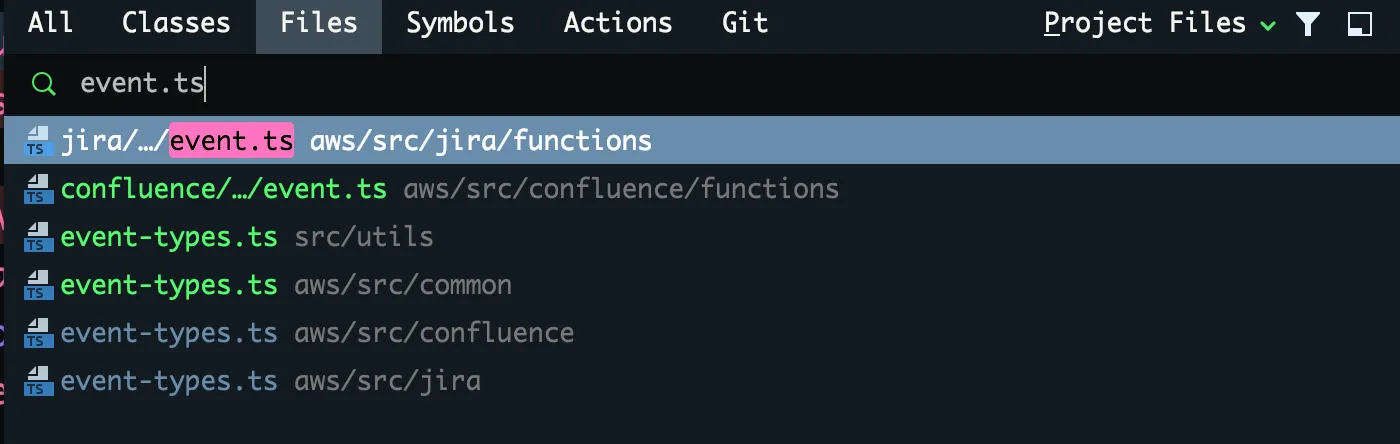
When opening a file, WebStrom also shows some part of the parent folders so that you can understand which event.ts file you are editing as shown in the below screenshot.
Here comes the problem. Source maps was working fine before this refactoring. That means, I could put a breakpoint in one of the .ts files and debugger would stop on that line and I was able to debug on .ts file. After this change, I could no longer put breakpoints on .ts files and only way to stop debugger is putting a debugger; statement inside the source file. Also debugger is showing corresponding .js file, not .ts file. Although this is still workable, I wanted to understand what was wrong. After some investigation, I have noticed that, tsc compiler is creating event.js.map files with just using “event.js” identifier:


This was causing WebStorm debugger to unable to find corresponding .ts file. As you can guess, renaming files to jira-event.ts and confluence-event.ts fixed this problem. I hope this information helps someone else too. From now on, I will return back to naming files uniquely.