How We Moved Our Blog Off Medium Without Losing a Single URL
Medium blocked our account with no explanation. Five years of posts went dark. Here is what it actually took to rebuild the blog on AWS with every original URL still working, and why that job used to be a week of miserable manual work.
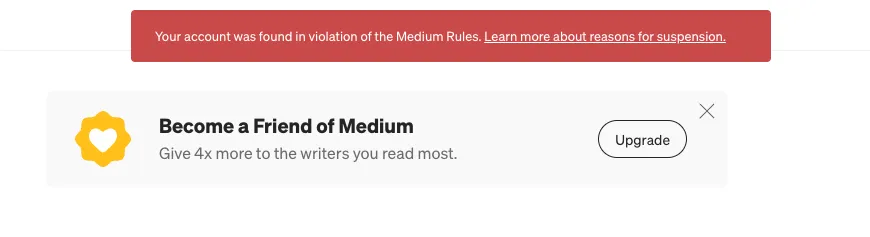
Medium blocked our account.
No warning, no explanation, no specific violation cited. We have written about Jira configuration, Atlassian app development and the working habits behind them since 2021. Nothing controversial, nothing automated, nothing that looks remotely like the sort of thing platforms ban people for. One day blog.thestarware.com simply stopped serving our posts.
We are not writing this to argue with Medium. We are writing it because of what happened next, which genuinely surprised us: the whole blog was rebuilt and back online the same afternoon, with every URL exactly as it was.
Five years ago that would have been a week of tedious, error-prone work, and we would have lost search rankings anyway.
Whether you can appeal depends on where you live
Here is the part that bothers us more than the suspension itself.
If you are in the European Union, this situation has rules attached to it. The Digital Services Act requires a platform to give you a statement of reasons explaining what it acted on, to run an internal complaints process you can use free of charge for at least six months, and to let you escalate to an independent out-of-court dispute body if that goes nowhere. You are entitled to an actual answer, and to argue with it.
If you are outside the EU, none of that applies. Whatever appeal route exists is entirely at the platform’s discretion: offered as a courtesy, on its own timetable, with no obligation to explain itself and no one to escalate to.
We are in Turkey. European by geography, outside the EU by law. Same platform, same terms of service, same generic notice, and a different set of rights depending on which side of a border the account was opened on.
That asymmetry is worth sitting with. Two companies can publish identical content on the same platform and receive identical suspensions, and one of them gets a reasoned decision and a right of reply while the other gets a red banner and a link to a help page. The content did not decide that. Jurisdiction did.
We are not arguing that platforms should never suspend accounts. They should, and they have to. The point is narrower: a decision you cannot question is not a decision, it is just an outcome. And if you have no way to be heard, the only leverage you have left is the ability to walk away, which is exactly why the rest of this post is about how quickly we could.
The only thing that saved us was having the data
Before anything else: we were able to download a full export of our content.
We want to be honest that this was partly luck. Our account was blocked, not deleted, and the export still worked. Had it gone the other way, no amount of clever tooling would have helped. You cannot migrate content you cannot reach.
So take the boring advice first: export your data now, while nothing is wrong. Not when you need it. Every platform that hosts your writing has an export button somewhere. Use it on a schedule, keep the archive somewhere you control, and treat the ability to leave as a feature you are paying for.
Why the URLs mattered more than the content
Rebuilding a blog is easy. Rebuilding a blog that Google already knows about is the hard part.
Our posts had been indexed for years. People linked to them, our documentation referenced them, and search traffic arrived at addresses like:
/using-jira-sum-up-fields-in-jql-the-issue-navigator-and-dashboards-2de1b7a6c4bbThat trailing hex is Medium’s post ID. It is meaningless to a reader and slightly ugly, and there was a real temptation to “clean it up” during the move. That would have been a mistake. Change those URLs and every inbound link 404s, every ranking resets, and you spend six months clawing back traffic you already had.
So the rule for the whole migration was simple: every published post keeps the exact address it had, character for character.
What actually went wrong
This is the part worth writing down, because none of it is obvious and all of it would have burned hours by hand.
The export lies about your images. The HTML files reference Medium’s downscaled 800px copies, not your originals. The originals are still there, served from a different URL pattern entirely. Our largest was 6240px wide; the export pointed at an 800px version of it. Anyone doing a naive migration ships permanently degraded images and never notices.
Filenames are not URLs. The export names files after the post title. But four of our posts had been retitled after publication, and Medium keeps serving the original slug. A post filed as Standing-Desk---Treadmill---Treadmill-Desk was actually published at /standing-desk-and-treadmill-5d91e677d35a. The real address is in a p-canonical link buried in each file’s footer. Trust the filenames and you silently break four posts.
An invisible character broke a third of the archive. Medium repeats the post title as a heading inside the body, which needs removing so the title does not appear twice. The obvious approach is to compare the heading text against the title and drop it when they match. They look identical. They are not: the heading uses a non-breaking space (U+00A0) where the title uses an ordinary one. The comparison silently failed on 32 of 48 posts, every one of which would have shipped with its title printed twice.
Replies are exported as posts. Medium stores a response to someone else’s article as a story, with its own public URL. One of ours was a 50-word support reply that began “Hi Justin,” and it arrived in the export structurally identical to a real article. It went live as a blog post before we caught it.
Serving clean URLs from S3 needs real work. A static build produces some-post.html, but the indexed address has no extension. Bridging that takes a small function running at the CDN edge, and it has its own traps. Ours mangled every redirect on the first attempt because CloudFront hands you the query string as an object, not a string, and an empty object is truthy, so string concatenation produced a literal ?[object Object] on the end of every redirect. Separately, a private S3 bucket answers 403 rather than 404 for a missing file, so our custom 404 page never appeared until we mapped both.
None of these are exotic. They are the ordinary texture of moving between two systems that were never designed to talk to each other.
What AI actually changed
Here is the honest version, because there is enough breathless nonsense written about this already.
AI did not make the problems disappear. Every single issue above still had to be found, understood and fixed. The non-breaking space did not announce itself; it showed up because someone looked at a rendered page, noticed the title twice, and went digging through character codes.
What changed is the cost of each iteration. Writing a converter that walks 50 HTML files, extracts canonical URLs, downloads original-resolution images, rewrites internal links and emits clean Markdown is maybe two hundred lines. Writing those two hundred lines used to be an afternoon in itself. Now it is a few minutes, which means you can afford to throw the whole thing away and rewrite it when you discover the images were wrong. And then again when you discover the filenames were wrong.
That is the real shift. Not “AI did the migration”. It did not. It made the feedback loop cheap enough that a job which was economically irrational became a routine afternoon. Before, you would have looked at 50 posts, estimated a week, and quietly decided to live with the platform that was mistreating you. That calculation is what changed.
The same applies to the infrastructure. The site is a static build on S3 behind CloudFront, with a URL-rewriting function at the edge, automated deploys, and a test that fails the build if any indexed URL ever stops being generated. That last one matters more than it sounds: the whole point of this exercise was preserving 42 addresses, and now nothing can quietly break one without CI shouting about it.
What we would tell you to do
- Export your content today. Not after something goes wrong. The export button is the most important feature any platform offers you, and you find out whether it still works at the worst possible moment.
- Own your domain. This is what made recovery possible at all. Our posts lived at
blog.thestarware.com, not atmedium.com/@thestarware. When the platform went away, the addresses did not. If your writing lives entirely on someone else’s domain, you are not migrating. You are starting over. - Keep the ugly URLs. Whatever slug format your old platform used, keep it exactly. Aesthetics are not worth your search rankings.
- Verify against the old site, not against your expectations. We checked all 42 original URLs return
200on the new infrastructure, and wired that check into CI. Assumptions are what break migrations.
Where we ended up
The blog is now a static site on our own AWS account. It is faster than it was, it costs a few dollars a month, the content lives in a git repository we control, and every post is exactly where it always was.
We would rather this had not happened. But the useful conclusion is not “Medium is bad”. Platforms make mistakes, and ours may well be reversed. It is that the cost of leaving has collapsed, and that quietly changes your relationship with every vendor you depend on.
Being able to leave is what makes staying a choice.