Difference Between Jira Installation Folder and Home Folder
We got a lot of support request for our Jira add-ons and we request our customers to provide us with the log file. We have noticed that a…
We got a lot of support request for our Jira add-ons and we request our customers to provide us with the log file. We have noticed that a lot of customer does not know where to look for this log file.
When installing Jira, you have to use two different folders, one for executables downloaded from Atlassian’s site, and the other is for Jira itself to store logs, caches, downloaded plugins and other files. You can see content of these two folder side by side in the following screenshot.
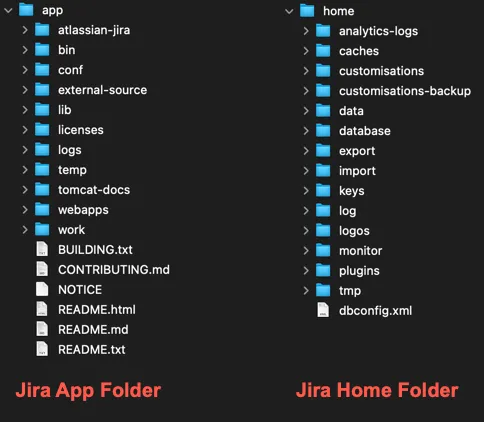
Location of Home folder is specified in setenv.sh (Linux/Mac), or setenv.bat (Windows) file located in bin folder inside the App folder.
This folder structure makes upgrading Jira also easier, you can mostly replace content of App folder with new Jira version and start the Jira. It will automatically perform necessary changes in the home folder and database. There may be a few files you may had replaced/changed in the App folder so it is a good idea to make a comparison before overriding files in App folder. Mostly you may need to check following files.
bin/setenv.sh or bin/setenv.bat file: You may have set some environment variables like location of Home folder and JVM heap size.
conf/server.xml: You may have specify a different port number other than the default 8080.
lib folder: Jira comes with some dependencies and you may have replace some of them for various reasons. For example you may have replaced Log4J dependency for mitigating famous CVE-2021-44228, Remote Code Execution Vulnerability with critically score of 10/10.
Some of the important files and folders in Home folder of Jira are:
log: All jira logs are stored in this folder. When a vendor asks for log file, they are most probably asking you for atlassian-jira.log file inside this folder. A lot of users confuses this folder with App Folder/logs folder. Later is used for Tomcat and JVM logs, not for Jira itself.
dbconfig.xml: This file stores database connection information.
import/export: Jira’s xml backups are stored in export folder and if you want to import a backup file to Jira, you need to place it inside import folder.
plugins: Plugins downloaded from the marketplace or bundled but later upgraded are stored in this folder. If a plugin is preventing Jira from starting, you can remove it from this folder before restarting Jira.
data: Large files, such as attachments, avatars which are not stored in Jira database are stored here. If you backup Jira database you also want to backup this folder too.
database: If you are using build-in database for demo/trial installation this folder stores h2sql database. Otherwise it is not important.